Available immediatelyAgentic process automation · AI engineering
I turn manual workflows into AI agents that do the work.
Business Informatics graduate who designs, builds and ships agentic systems, from a rule-based automation to a Claude-driven agent that runs it end to end. Based in Luxembourg.
Thirteen years on three tracks. Scroll to sweep through them.
2026 · Bachelor thesis, Design Science Research
From Robotic to Agentic Process Automation
University of Cologne · Luxembourg marketing agency as industry partner
Rebuilt the agency's live client-onboarding workflow (Make.com, ClickUp, PandaDoc, Google Drive) as a Claude-based agentic system and derived design principles for the migration.
Next
And next up: your company?
Available immediately. Permanent or freelance, on-site or remote in the EU.
Universität zu Köln · Luxembourg agency as industry partner
Took a live client-onboarding workflow on Make.com (webhooks routing contracts and folders across ClickUp, PandaDoc and Google Drive) and rebuilt it as a Claude-based agentic system. Derived design principles for the migration; verification is built into every automated write step so the agent confirms the real end state.
Claude Agent SkillsMCPMake.comClickUp / PandaDoc / GDrivePythonDSR
Self-directed build · In daily use2025 – now
A working library of agent skills
Personal agent stack automating real recurring work
Composable Claude Agent Skills and MCP integrations: one orchestrator reads a lead from ClickUp, generates the contract in PandaDoc, reads back every field, then links the document to the CRM. Others reconcile Drive folder structures and sync research notes into Obsidian. Part of it runs on a home server (Ubuntu, Docker, Ollama, FastMCP).
Claude Agent SkillsMCP / FastMCPPythonOllamaDocker
Role as project · Data analyst2023
Data pipelines to feed an AI system
KIResult, Bonn · hybrid
Python scripts to structure and clean documents and datasets for the company's internal AI system. The half of applied AI that decides whether a model is useful: getting messy real-world data into a shape it can learn from.
PythonData cleaningDocument structuring
Internship · Database developer2022
Automated KYC onboarding platform
AIQUnited, Wecker · Luxembourg
Designed and built an automated KYC database for client onboarding in a regulated setting, and automated the recurring Microsoft Office reporting around it in VBA. A manual, error-prone compliance routine became a repeatable process.
VBAMS Office automationKYC / onboarding
02 · Projects & process
What I'm building now, and how I get there.
Not just the result: the research, the decisions and the dead ends behind it. A thesis, two websites shipped on Cloudflare, an iPhone app, a tool for managing coding agents and a bit of hardware.
Side project · Web, Mac, iPhone & CarPlay · In progressSep 2026 – now
Bubbleate
From a rough idea to a requirements baseline, and on to a demo app · still in deployment, not final yet · bubbleate.markschommarz.lu
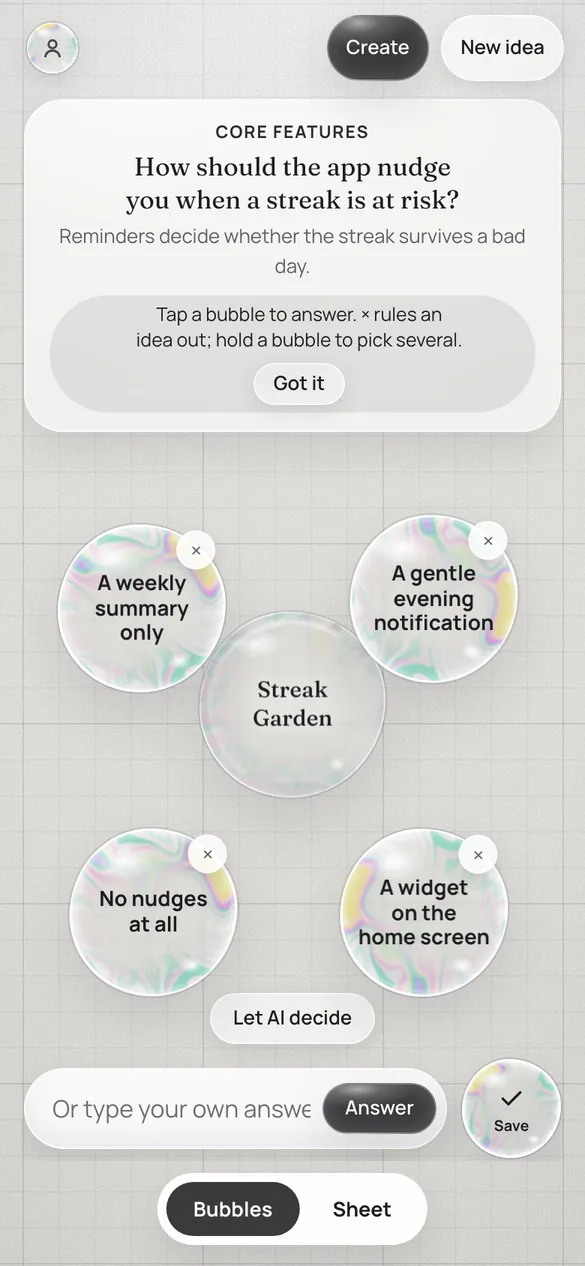
A calm, conversational tool: the AI asks one focused question at a time, each answer sharpens a live requirement sheet, and Create turns the finished baseline into a working demo app. It runs as a website and as a native Mac and iPhone app on one account, and in the car you can answer by voice through CarPlay. Guests can connect an AI and start refining right away; an account is only needed to save. Below is the whole of it: what it does, how the pieces talk to each other, what got better over the audit rounds, and how it is kept safe.
How it works
One loop, about ten seconds: the idea or answer goes to the canvas, Jev guesses the likely pick, the prompt travels through the gateway (the key is added on the server) to the model, and the reply comes back as the next question and operations on the baseline, which then sync to the account.
The real app
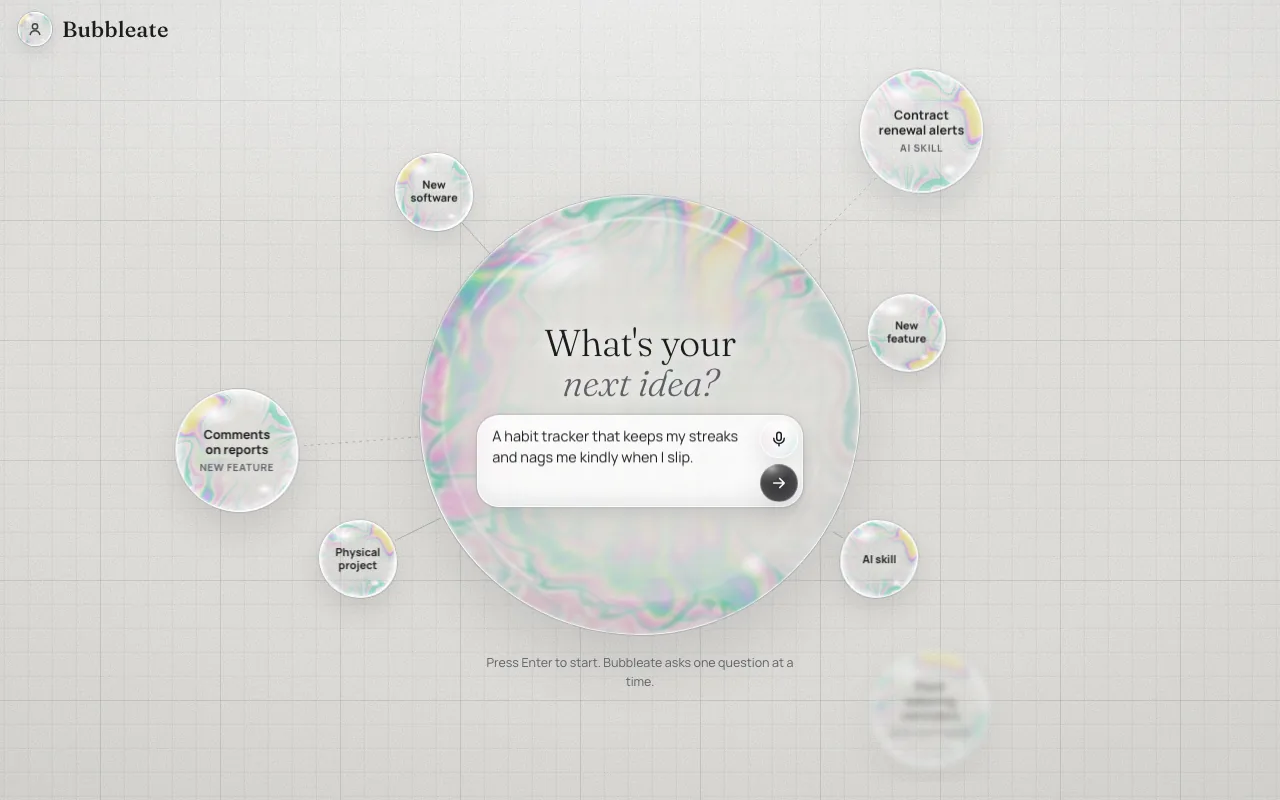
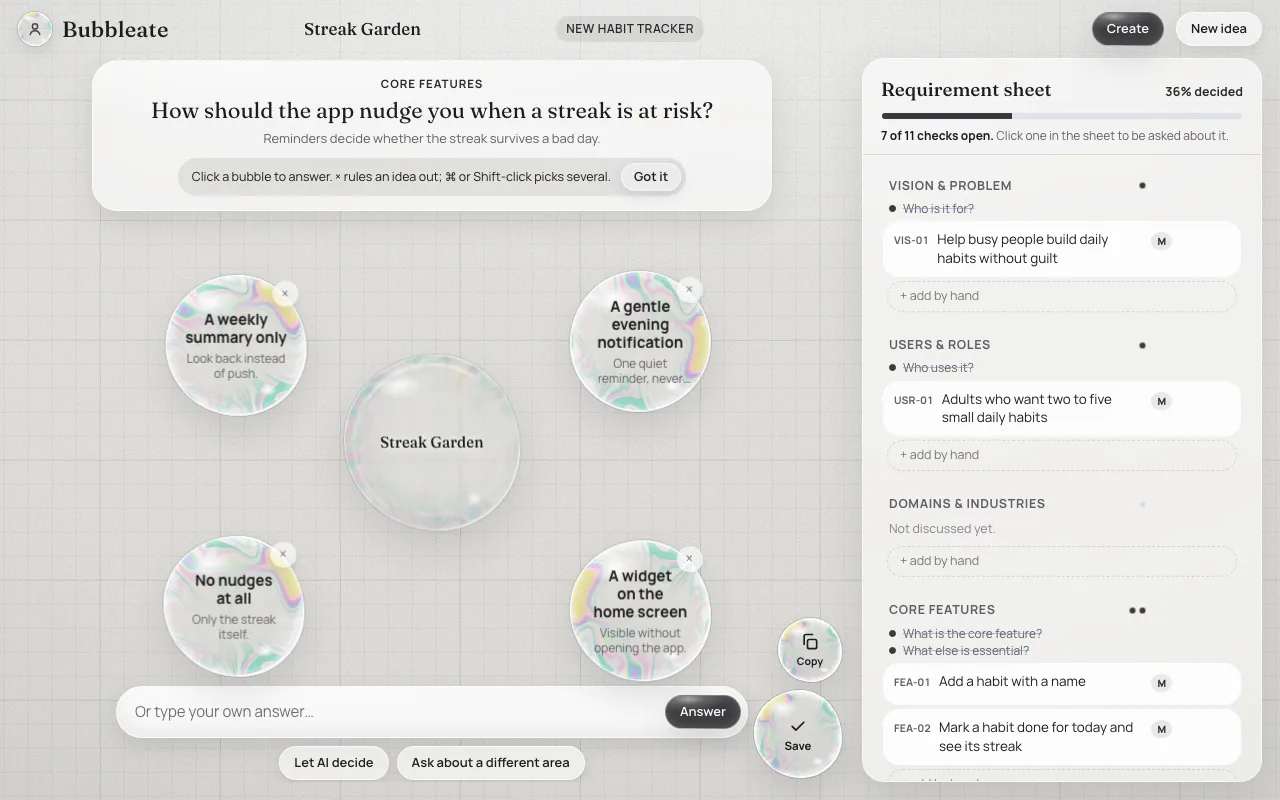
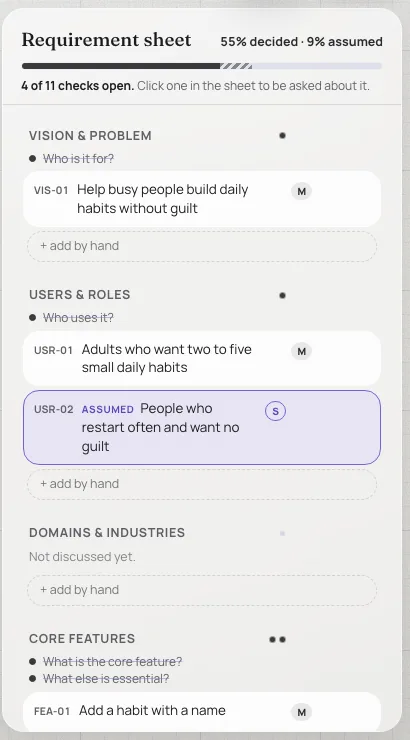
Start: one idea field, four mode bubbles.One question at a time, answered with bubbles.The sheet: decided versus assumed.The same canvas at iPhone width.
Screenshots of the web app with a made-up sample idea (a habit tracker), no account and a stand-in AI, so the questions shown are scripted.
What it does
Starts from a rough idea, typed or spoken, in one of four modes: new software, new feature, AI skill or physical project.
One question at a time with answer bubbles: click to fuse one into the idea, pop one to exclude it for good, write your own, or press Let AI decide to get flagged assumptions.
Copy the baseline as text, or press Create: your own AI builds a working demo app as one HTML file, checked in a hidden frame with up to two automatic repairs.
Platforms, accounts and sync
The website and the Mac and iPhone apps (SwiftUI, one codebase) show the same canvas page, bundled into the apps.
CarPlay is a voice-only conversation: questions and options are read aloud. It works in the Simulator; a real car still waits for Apple's entitlement.
Signing up to the one Supabase account takes an emailed 6-digit code.
Without an account, baselines stay on the device and the app shows Not saved; they move into the account on sign-in.
Bubble feel
Soap, not rainbow: a bubble is mostly clear, with thin-film colour in marbled streaks that gather at the rim. The scene is made of the same ingredients as the app, including its soap-film texture.
Thin-film colour, turning slowlyTouch: squash, stretch, settleMerges into the logoMenu grows out with a jelly wobbleDrift and rise60 fps on iPhone and iPadReduced-motion rulesLight and dark mode
New idea from Streak Garden
A gentle evening notification
HomeMy bubblesAccount
AI connections
Several connections sit side by side, one per provider, and one tap switches between them. Requests, tokens and cost are tracked per session and month.
A connection follows the account only if you opt in; its key is then stored encrypted (Supabase Vault). Subscriptions and Ollama belong to one computer and are never synced.
The local bridge queues requests per CLI, caches their status and starts the next Claude Code process ahead.
Thinking ahead and Jev
Think ahead prepares the next question for each option while you are still deciding; it uses more of your AI usage and can be switched off.
Jev (TypeSafe) ranks which answer you will most likely pick, so that one is prepared first and answers it rates under 3 % are not prepared. Thinking ahead waits at most 1.2 s for it, then starts in the old order.
Jev is built but off until a TypeSafe key is set: on the account server for the website and apps, or on the bridge with TYPESAFE_API_KEY. The key never reaches the page, and a daily allowance per person (300 calls by default) limits its use.
Improvements
Written audit rounds on architecture, bubble feel and security, each ending in decisions and open items.
The page ships minified (605 to 446 KB), and the account list loads small summaries instead of whole baselines.
Starting the next Claude Code process ahead cut the first event from about 0.8 s to 0.07 s in a Linux measurement.
A demo build that goes silent is stopped and retried; an account holds at most 1000 baselines.
Security and testing
For account users the API keys stay on the server: an AI gateway adds the key, and synced keys are stored encrypted in Supabase Vault (Keychain in the apps).
Row-level security in the account database; the Edge Functions check the sign-in token themselves.
CSP by script hash, Trusted Types and HSTS; generated demos run in a sandboxed frame with no network access; the bridge answers only its own page.
Browser, bridge, Edge Function and pgTAP database tests run in GitHub Actions on every push. Open: a demo build still fetches a synced key for its request.
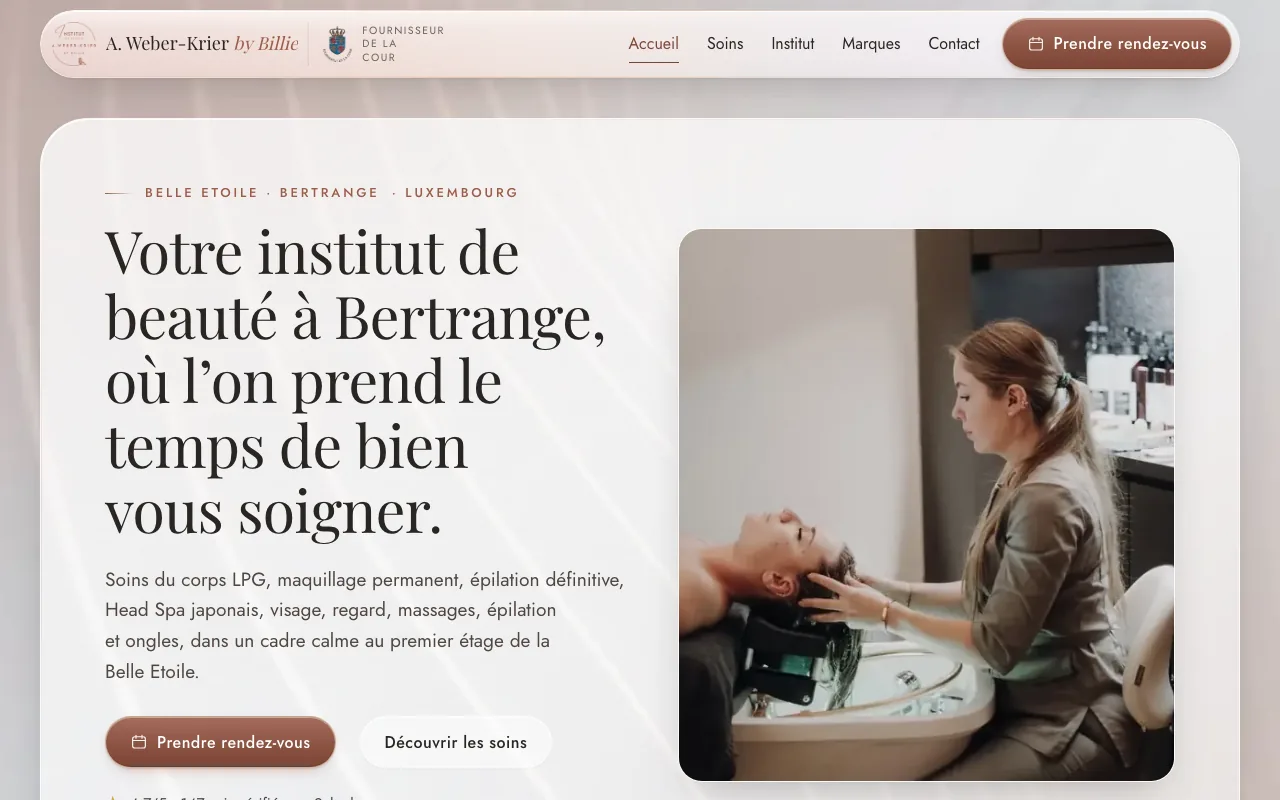
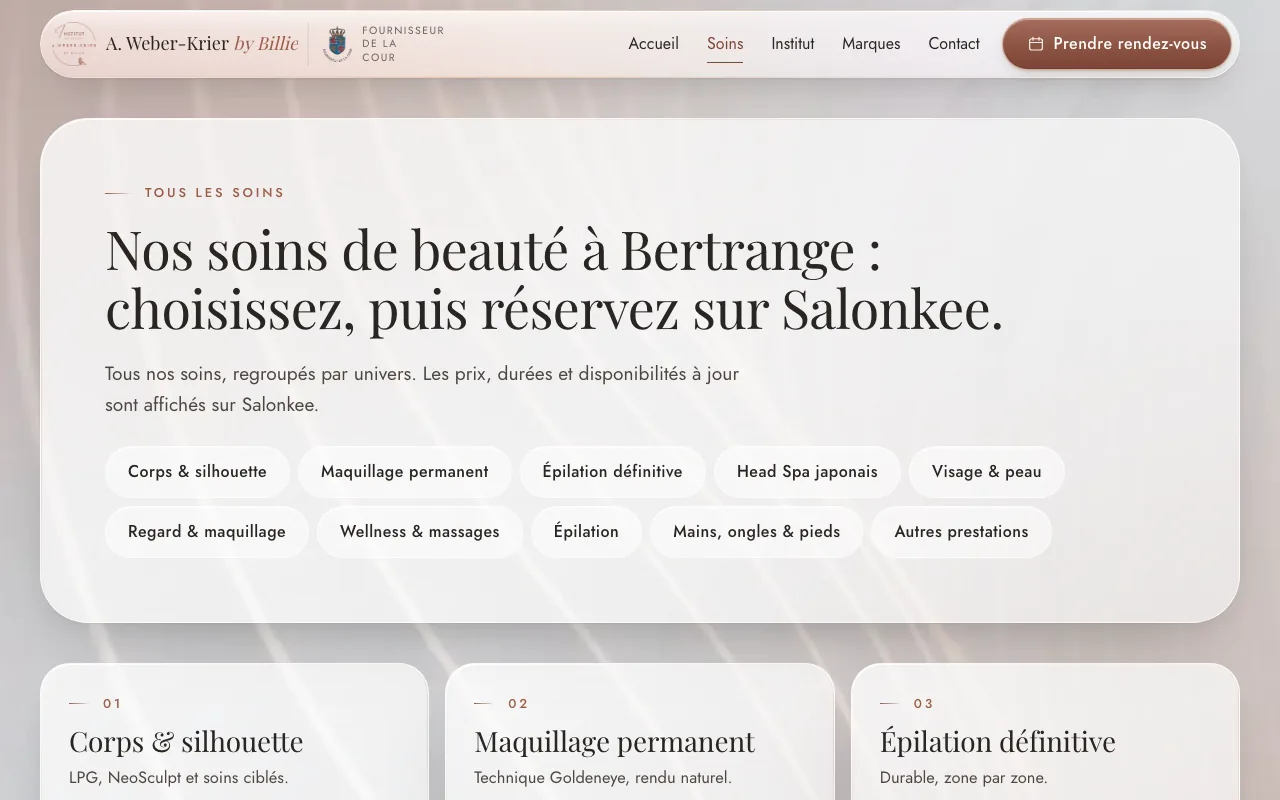
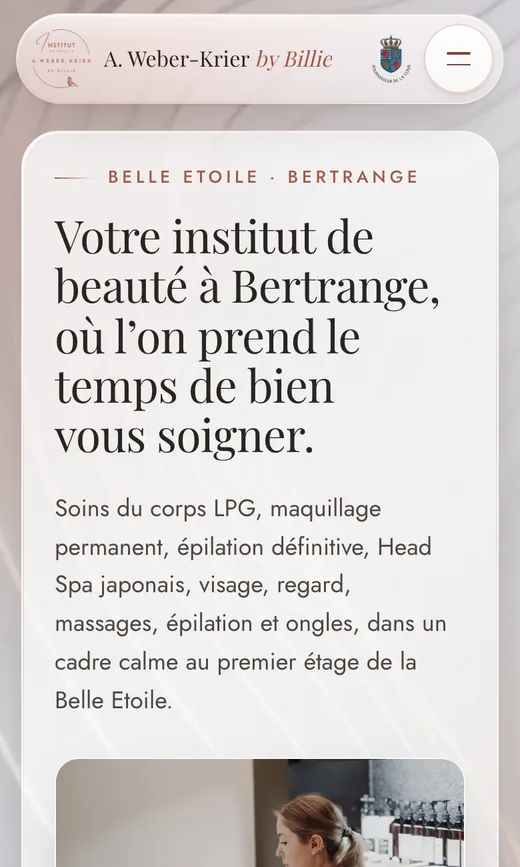
A calm, premium website for a local salon, built from research first and shipped on Cloudflare. Static pages from a small Node generator, booking handed straight to Salonkee through deep links, and nothing on the page the salon owner has to maintain by hand.
The home page at desktop width.The services page, with booking handed to Salonkee.The same site on a phone.
The process
1ResearchUX and SEO requirements, services and opening data, brand and image sources, open questions for the client.
2DesignDesign and photo brief from the original logo: a quiet tour through the treatments, motion that feels like a visit.
3BuildStatic generator with shared partials; scripts sync the Salonkee catalogue and exceptional Sunday openings.
4AuditCSP and security headers, legal pages, local SEO, iOS Safari toolbar quirks, tablets and foldables.
5ShipClient feedback round, a go-live build that refuses to run while client data is missing, then deploy.
What I learned hosting on Cloudflare
Served as Workers static assets: a wrangler.jsonc points at the generated folder, so there is no build step on Cloudflare's side.
The domain resolves only once the registrar hands DNS to Cloudflare's nameservers; until then only the workers.dev preview works.
_redirects fails the deploy on a domain rule, so www → root is a 301 Redirect Rule instead.
_headers carries the CSP, HSTS and immutable caching for fonts, CSS and JS.
A git push does not publish. Every change ends with wrangler deploy and a curl check that the live files match.
Bachelor thesis · Design Science ResearchJun – Aug 2026
From Robotic to Agentic Process Automation
University of Cologne · Luxembourg marketing agency as industry partner
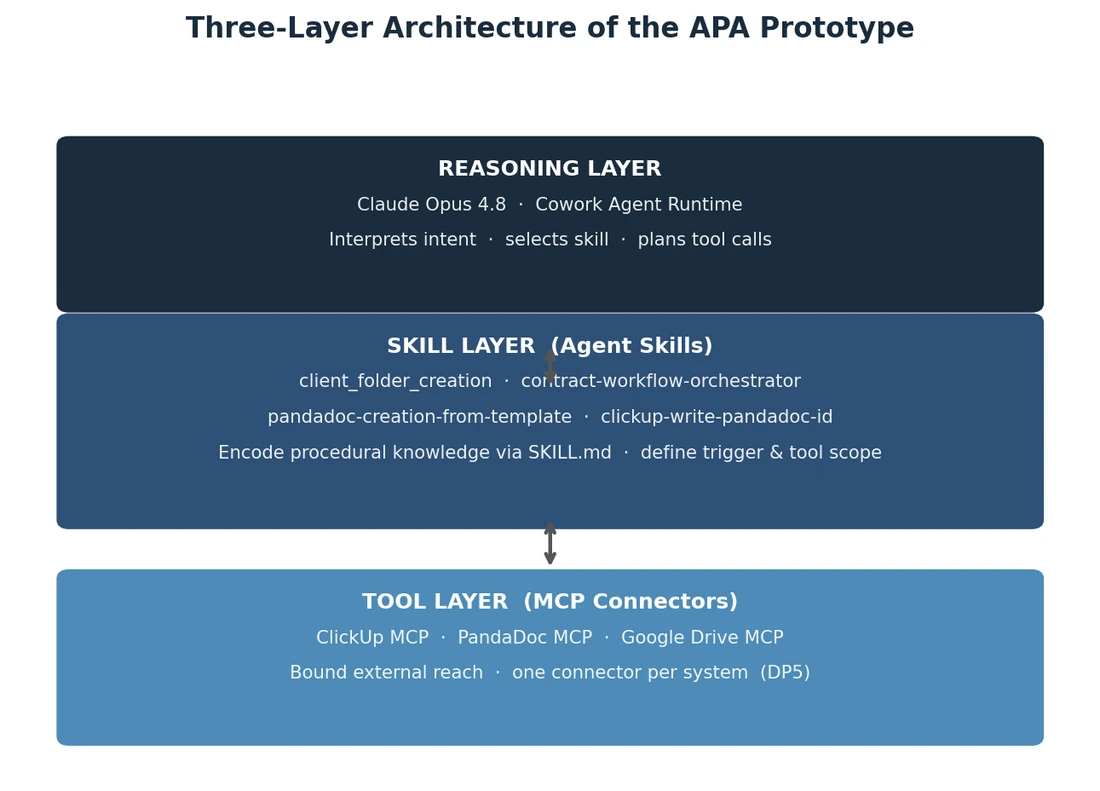
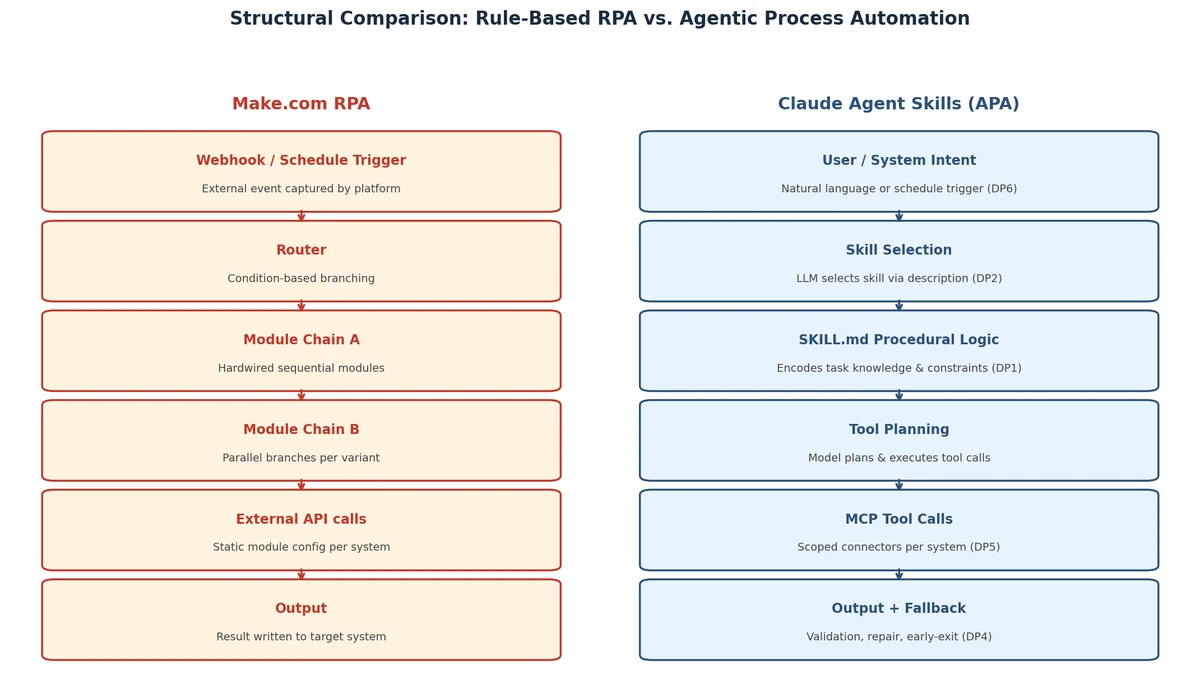
How do you turn a rule-based Make.com workflow into an agent that does the same job, and what should guide that move? I rebuilt two live agency workflows (client onboarding and contract generation across ClickUp, PandaDoc and Google Drive) as Claude Agent Skills, kept a research diary through every decision, and condensed the findings into six design principles.
Figure from the thesis: the three-layer architecture of the prototype.Figure from the thesis: the rule-based workflow next to the agent version.
The process · DSR after Peffers et al.
1ProblemRule-based automations break silently when an interface changes and grow hard to maintain.
2ObjectivesSame business outcome as the Make.com scenarios, with less wiring and verified writes.
3DesignModules grouped by responsibility into an orchestrator and sub-skills, routed in natural language.
4DemonstrationBoth workflows run against the agency's real ClickUp, PandaDoc and Drive data.
5EvaluationFailure behaviour compared side by side: invalid task IDs, missing or empty fields.
6CommunicationThesis, research diary and progress documentation, submitted 2026.
The artefact · six design principles
DP1Functional unit decomposition
DP2Natural language routing
DP3Idempotent batch execution
DP4Resilient fallback handling
DP5Tool boundary separation
DP6Explicit trigger allocation
From the research diary · 17 Jun 2026
The agent provides the reasoning and execution layer, not the event-ingestion layer. Platforms like Make.com hide that by bundling trigger, logic and action in one place, so a migration forces an explicit decision on where the trigger lives.
Coder ViewA calm way to manage many Claude Code agents at onceOct 2026 – now
Side project · Agent dashboard · In developmentOct 2026 – now
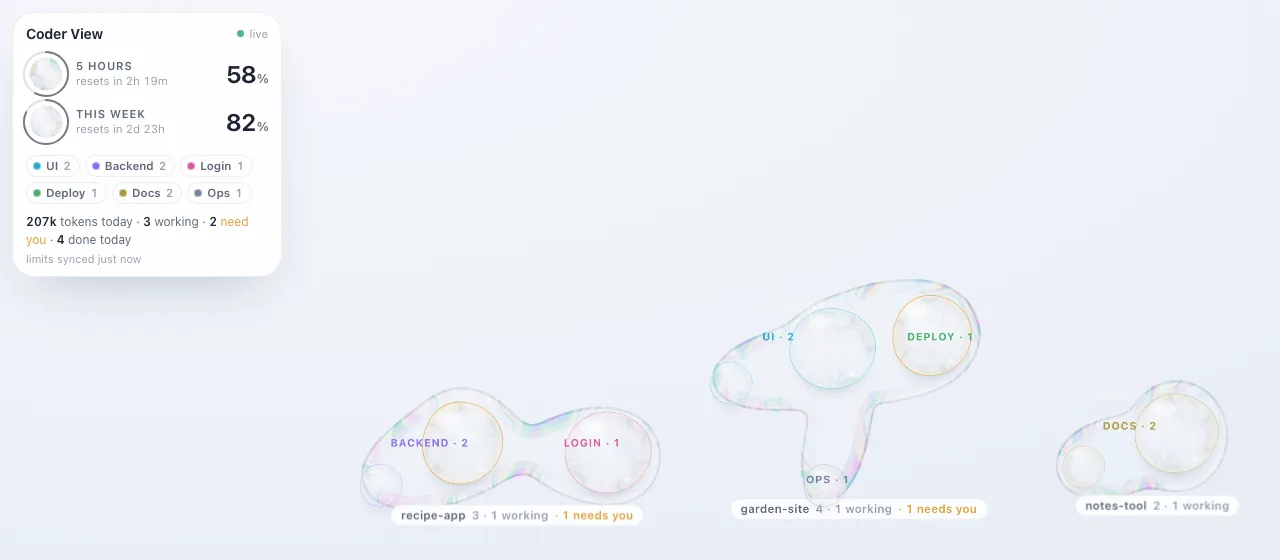
When several coding agents run in parallel, the hard part is knowing which one needs you. Coder View turns them into a live map: each project is a soap puddle, each chat a bubble, big while it works, amber when it waits for an answer, small and clear once it is done. Still under active development.
The live map, shown here with made-up sample projects and agents.
A token HUD shows the 5-hour and weekly plan limits with reset countdowns, read from a snapshot the Claude Code status line writes.
Chats are grouped by topic (UI, backend, login, deploy, docs, ops) from keywords in their name and prompt.
Pan, pinch and zoom like a map, with a minimap and edge markers pointing to agents off-screen that need you.
Agents on Remote Control get an Open session button, so I can answer from the iPhone over Tailscale as a home-screen app.
Projects pool into organic puddles that pull and push each other like a graph view, so busy areas stay readable.
One small Python server using only the standard library, refreshing every 5 seconds, started and stopped with a single coderview command.
Commits in 2 days
10
Lines of code
1.4k
Python dependencies
0
Refresh
5 s
Claude CodeMulti-agent workflowsPythonCanvas UIPWATailscale
Liquid Glass on the open webTranslating Apple's 2025 design language to plain HTML and CSSSep – Oct 2026
Design research · This page · Live on CloudflareSep – Oct 2026
Apple's rule is that glass belongs to navigation and controls, floating above content. So this page uses three glass thicknesses: clear for the nav, thick for anything you read. Real refraction (an SVG displacement filter) runs where Chromium supports it; every other browser gets blur, saturation and specular edges.
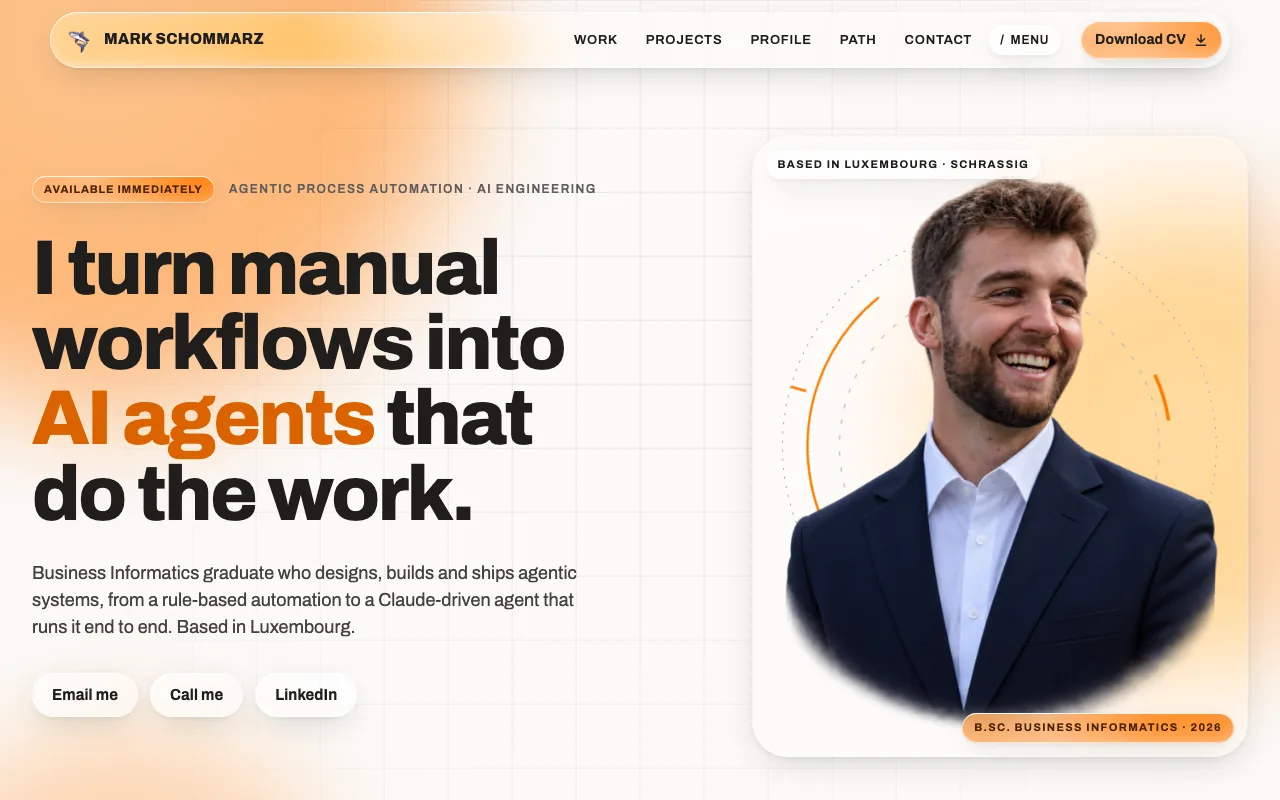
This page on desktop: clear glass for the nav, thicker glass for content.The same page at phone width.
The glass steps aside for reduced transparency, higher contrast and reduced motion.
No framework, no cookies, no third-party requests; a strict CSP allows only this site.
Designed, built and put online on Cloudflare within a few days, using the same research-first workflow as the salon site.
Code (HTML, CSS, JS)
100 KB
Frameworks
0
Third-party requests
0
Glass thicknesses
3
HTML / CSS / JSbackdrop-filterSVG filtersAccessibilityCloudflare
CarFuelTrackerNative iPhone app for fill-ups, fuel prices and consumption2026
iOS app · In development2026
Log a fill-up in seconds: date filled in, fuel price fetched automatically and still editable. The dashboard shows total distance, spend, latest price and average consumption, with trend charts per car and a home-screen widget.
The app icon.
Several cars, switched from one top-level menu; all data stays on the device.
Price lookup behind a small provider interface, with a regional average as fallback; unit tests for the consumption maths.
Swift files
16
Lines of Swift
3.5k
Targets
3
Cloud accounts
0
SwiftSwiftUISwiftDataSwift ChartsWidgetKit
A plant that asks for waterESP8266 soil-moisture sensor driving a smart lamp2026
IoT · Hardware2026
A small microcontroller reads soil moisture every few seconds, maps it to a percentage, and switches a WiZ smart lamp on over the local network (UDP) when the plant gets too dry, and off again once it has been watered.
Calibrated between dry air and water readings, with a single threshold to tune.
Remembers the lamp state, so it only sends a command when something changes.
Lines of C++
67
Reading every
5 s
Dry below
30%
Cloud services
0
ESP8266Arduino C++Wi-Fi / UDPWiZ
Where it startedThe smaller builds that taught the basics.
AVL tree visualiserJava · Swing GUI · Maven · 2022
Learning PythonPong, calculator, CSV high scores · 2022 – 2023
Site operated by Mark Schommarz, 9, Rue d'Oetrange, Schrassig, Luxembourg. Email: mark.schommarz@gmail.com. This is a personal, non-commercial website presenting my professional profile.
Privacy
This site sets no cookies and uses no analytics or tracking. Nothing you click is stored. The phone number is revealed only on user interaction; that interaction is not recorded.
The site makes no requests to third parties: fonts, images and scripts are served from this site itself. If you email or call me, your details are used solely to reply and are deleted once the exchange is over (Art. 6(1)(b) GDPR). Under the GDPR you may request access, rectification or erasure at any time by email. Supervisory authority: CNPD, Luxembourg.